

Annotating human motion data for robot learning means turning footage into labels a policy can train on. We do it in two layers. The Check API marks every second of a session usable or not, gives a reason code for each bad second and returns a verdict. On multi-view footage, 3D hands (21 joints each), bodies, camera poses and objects are solved from the cameras and checked against a camera left out of the solve: 12–15 mm median on our tabletop hands. Task titles and step lists come with the egocentric data.
01What gets labelled
| Label | What it is | How it is checked |
|---|---|---|
| QA timeline | Each second usable or not, with a reason code | Automatic, on every camera, per second |
| Verdict | Accept, accept in part, or reject for the session | From the timeline against the agreed criteria |
| Task and steps | Task title and the list of steps performed | Step lists come with egocentric orders |
| 3D hands | 21 joints per hand in one world frame, with confidence and visibility | Held-out camera error per clip |
| 3D body and contacts | Body joints in metres, foot contacts, measured ground | Held-out drone reprojection; ground against survey lidar |
| Cameras | Intrinsics, poses and clock offsets for every camera | Calibrated from the footage, no markers |
| Objects | Object pose, masks in every view, grasp onset and release | Masks against the fitted 3D object and a held-out view |
02Per-second QA with the Check API
Upload a session with a head camera plus up to four fixed cameras, or a moving camera such as a drone. The report comes back as JSON with a stable schema: a timeline of usable and unusable seconds per camera, a reason code for each bad second (head_blurry, exposure, camera_moved, no_hands_head and others), a session verdict and plain feedback for the crew before the next take.
It runs on your own footage as well as ours, so a capture team can find a moved tripod or a blurry head camera while they can still reshoot. Sessions finalized up to December 31, 2026 are free during the preview, and a setup check on the first 60 seconds is free. Start with the quick start, the reason codes and an example report, or get an API key with your work email.
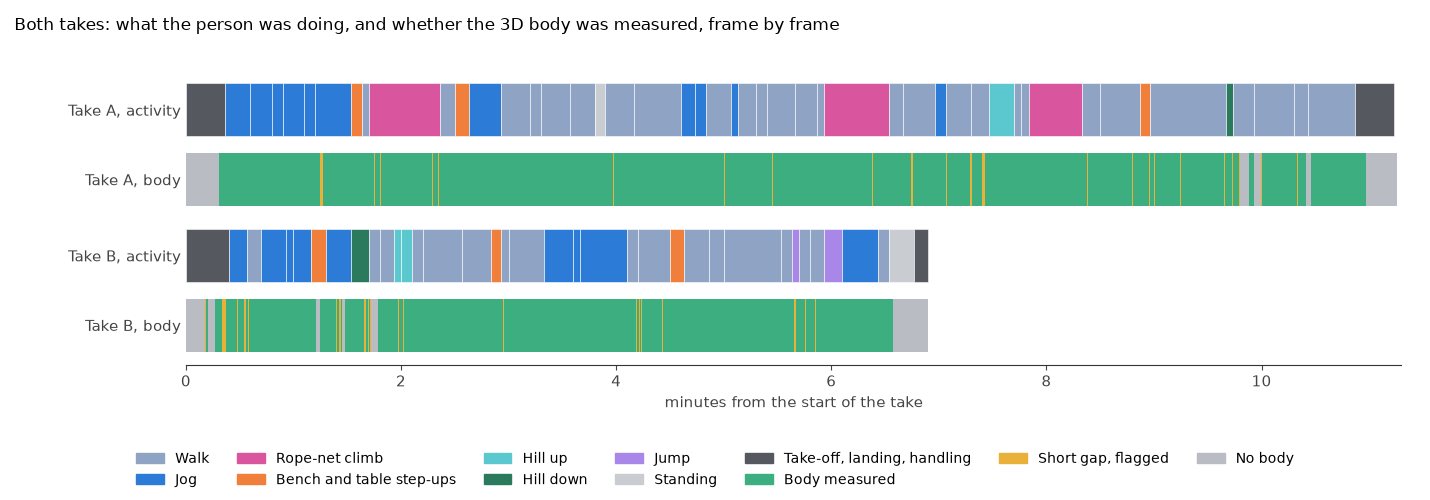
03Activity labels and coverage, frame by frame
For long sessions, every frame carries a flag: measured, a short gap of up to 2 s that is marked as such, or no body. Nothing is filled in silently, and stretches seen by fewer than two cameras are left empty. On an afternoon of three-drone capture, the 3D body was measured on 90.6% and 87.1% of the frames of the two takes, and on 90–99% of the frames of every moving activity.
043D labels checked against a held-out camera
A label that is never checked is a guess. For every multi-view clip we leave each camera out of the 3D solve in turn and compare the result with what that camera saw. The number goes into the clip’s report, and clips that miss the agreed gate are cut rather than shipped.
| Label | Checked against | Result |
|---|---|---|
| Tabletop hands | A held-out fixed camera | 12–15 mm median; hands found in 81–98% of frames |
| Hands, placement in the room | Marker motion capture on a public benchmark | About 3 cm, against 7–10 cm for head-camera methods on the same frames |
| Outdoor body | A held-out drone at 1080p | 5–8 px median |
The same 3D hands can audit head-camera labels. Projected into the head view, they flag the frames where a head-camera hand label has drifted: with four outside cameras, the flags caught about two thirds of grossly wrong head-camera labels at about 70% precision (details).
05Why label quality matters for robots
In a simulated pick-and-place test, policies trained on our multi-view hand labels succeeded 21% of the time, against 8–12% for the same policies trained on head-camera labels and 29% for labels from motion capture. Better labels moved the policy most of the way toward the motion-capture result. This is physics simulation; we have no real-robot results yet.
06Limits
- Fingers hidden behind an object are the main source of hand error, with or without extra cameras.
- Egocentric-only footage gets QA, task and step labels; measured 3D labels need outside cameras.
- Reason codes describe what the cameras saw. They do not judge whether a task was done well.
Questions
What is human motion data annotation?
Labelling footage of people so a model can learn from it: which parts are usable, what task and step is happening, and where the hands, body, cameras and objects are in 3D.
Can I run the QA checks on my own footage?
Yes. The Check API takes a head camera plus up to four fixed cameras, or a moving camera, and returns a per-second report with reason codes and a verdict. It is free for sessions finalized up to December 31, 2026.
Are the 3D labels drawn by people?
No. They are solved from several synced cameras and checked against a camera left out of the solve, so every clip carries its own error figure.
How accurate are the hand labels?
12–15 mm median against a held-out camera on our tabletop clips, and about 3 cm from marker motion capture on a public benchmark, where head-camera methods land 7–10 cm.